![oxfordrisk.zendesk.comhctheming_assets01HZPK08F39VSQFMWBN7WG19VM.png]](https://help-centre.oxfordrisk.com/hs-fs/hubfs/social-suggested-images/oxfordrisk.zendesk.comhctheming_assets01HZPK08F39VSQFMWBN7WG19VM.png?height=40&name=oxfordrisk.zendesk.comhctheming_assets01HZPK08F39VSQFMWBN7WG19VM.png)
This article is for company admins. If you are an adviser or assistant user, you might be looking for the article about editing your details.
Assistant users need to be linked to one or more adviser users, which allows the assistant to issue questionnaires, send reminders, review results, and generally help manage an adviser's clients. An assistant who is not linked to any advisers will not be able to perform most tasks on the system.
There are 2 ways to link assistants to advisers:
Edit details of assistant
1. Open the account menu, select Users and groups, then choose Assistants.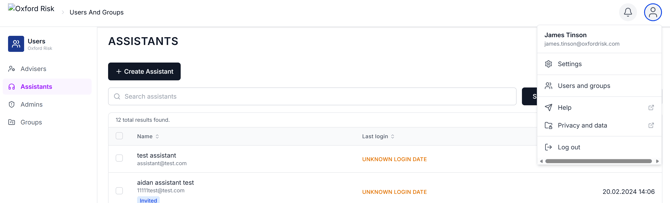
2. Search for and click the assistant.
3. Click Edit Details.
4. At the bottom of the page there is a section for Advisers this assistant supports. Select the Adviser(s) the Assistant needs to be linked with, and click Update Assistant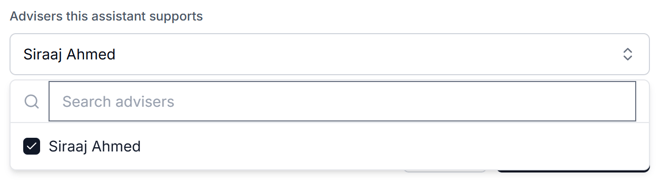
Through Groups settings
- Open the account menu, select Users and groups, then choose Groups.
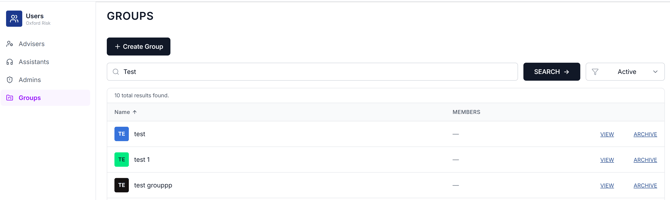
- View the relevant group
- On the Members tab, use the role filter to narrow to Advisers or Assistants if needed
-
Press Add member to link an assistant to the group (and, from here, to the advisers who share it).
-
To remove someone, use the trash icon next to their name.
Please note that an assistant who is not linked to any advisers will not be able to perform most tasks on the system.